AI agent · MCP

The visible agent

Toy DAW does not generate music by itself. It turns every action of a DAW into 54 MCP tools and hands them to your agent, such as Claude Code. The agent works step by step in the app while you watch, listen and stop it whenever you like.

Follow · draw · status

Once an agent connects, a status strip appears at the top of the workspace.

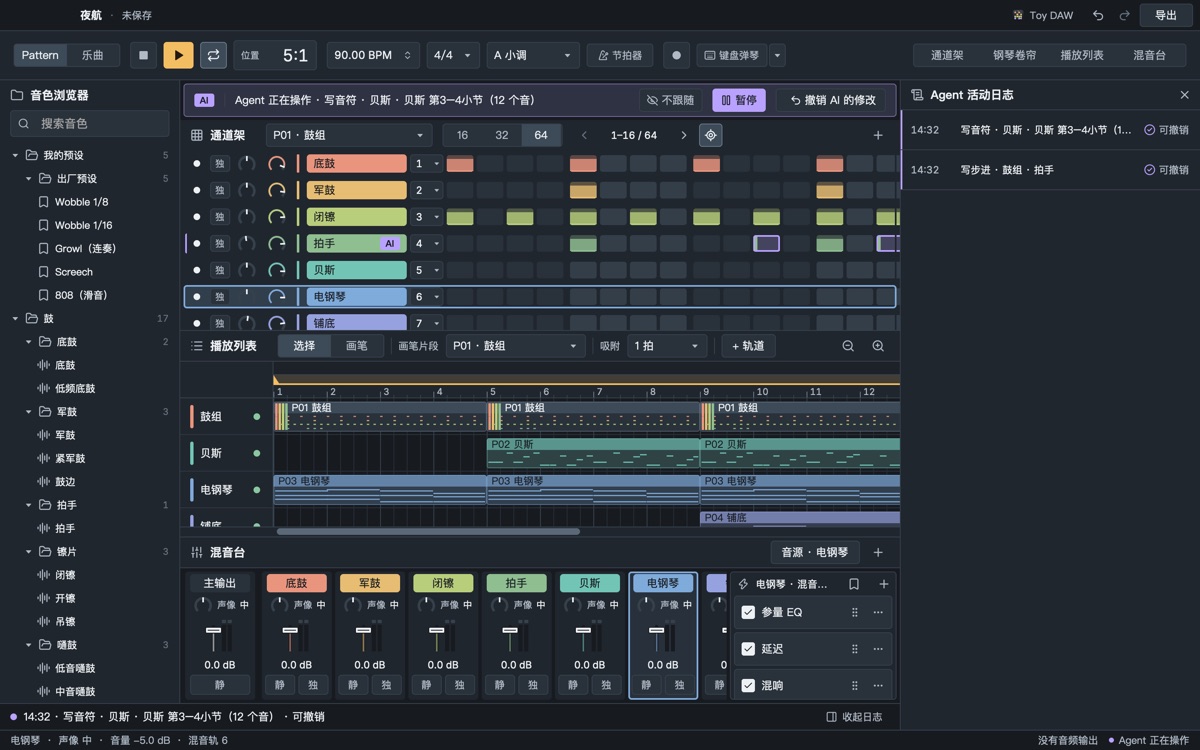
  • Status: “Agent at work · writing notes · bass, bars 3–4 (12 notes)”, one named sentence per edit, lit from the first call until 8 seconds after the last
  • Follow (on by default): notes take the window to that pattern and channel in the piano roll, arranging to the playlist, effects to that effect in the mixer; never while you are dragging, have a menu open or used the mouse or keyboard in the last 3 seconds
  • Drawn one by one: new notes, steps and clips appear in musical order, about 0.6 s at normal pace and 1.5 s at slow, or turn it off; only the picture is paced, the project is written at once
  • Off the home screen: the agent's first edit takes the app from the home screen to the workspace; projects it creates are saved to ~/Music/ToyDAW/工程 and show up in the recent list
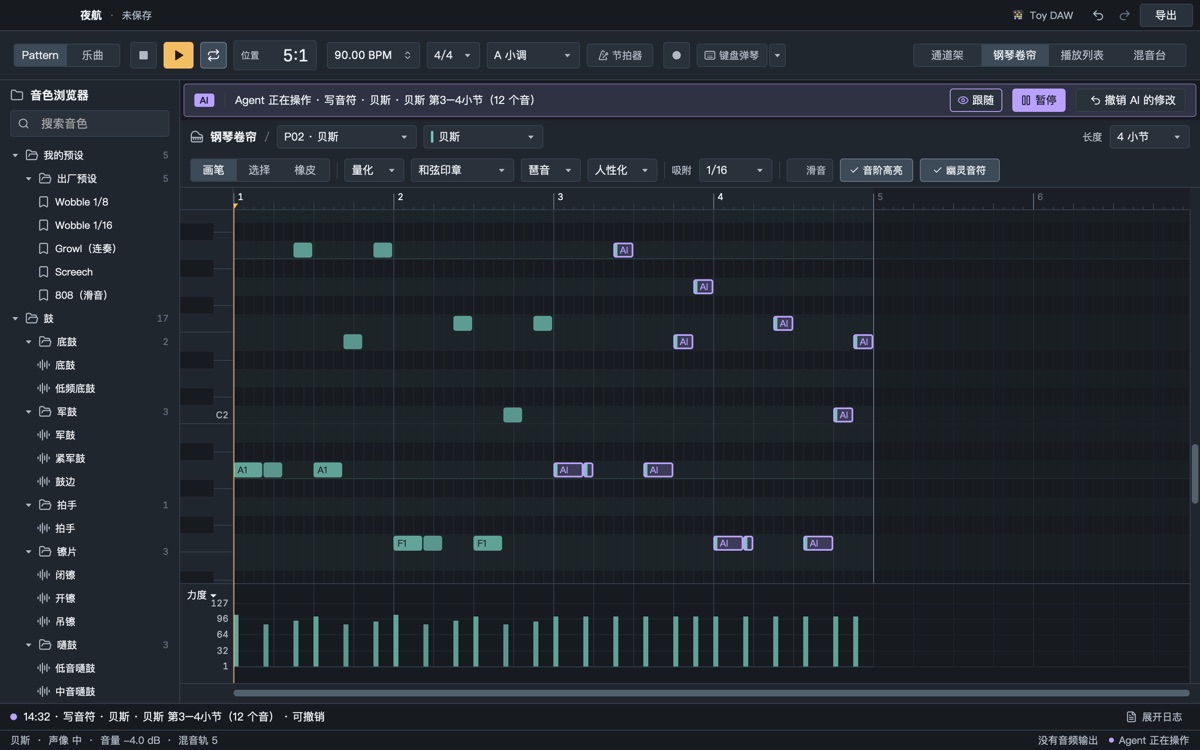
The status strip shows the agent writing notes; its notes in the piano roll are violet

You stay in charge

  • The agent edits the same project and the same undo history as you; its edits carry a revision check, so if you changed something in between, its edit is refused and it looks at what you did first
  • Pause / resume: while paused, its edits wait; reading still works
  • Undo AI edits: take back its whole batch in one click; if you edited after it, you are asked first
  • Steps and notes it wrote are violet and the channel is tagged “AI” until you edit that row
  • Overwriting an existing file asks you; new files don't
  • An activity log lists everything it did
The activity log lists each agent step; the status strip has pause and undo-AI buttons

Connect Claude Code

Open Toy DAW first. It serves MCP on 127.0.0.1:39927 (another free port if that one is taken; the actual port is in server.json). The token is in ~/Library/Application Support/ToyDAW/agent/token.

TOKEN=$(cat ~/Library/Application\ Support/ToyDAW/agent/token)
claude mcp add --transport http toydaw http://127.0.0.1:39927/mcp --header "Authorization: Bearer $TOKEN"

Then just tell Claude Code what you want, for example:

A 90 BPM lo-fi beat in A minor: drums, bass, electric piano, 16 bars.

Clients that can only launch a command

Clients like Claude Desktop that only take a command line use the command-line tool inside the app over stdio; when the app is running it forwards every message to it:

/Applications/ToyDAW.app/Contents/MacOS/toydaw-cli mcp

toydaw-cli status tells you whether it is talking to the running app or to a project file. With the app closed, toydaw-cli reads and writes project files directly (no window, so no follow mode or drawing).

What the 54 tools do

Three kinds: observe (read-only), edit (changes the project, undoable) and output (render, export, play). tools/list returns the 16 core tools by default to save context; the rest are found with find_capability, described with describe_tool and run with call_tool.

Look

get_project for the whole project at a glance, get_pattern to read a pattern (drums as step strings, melodies as shorthand notation, recognised chords at the end), get_mixer, get_params, what_changed (what the human did), get_recent_played (what the human just played on the keyboard).

Write

set_steps, write_notes in shorthand (A4:8 C5 E5:4 ~G2:8), edit_notes for conditional batch edits; add_channel, set_instrument, add_pattern, apply_ops (several steps that succeed or fail together, one undo).

Theory

theory_render expands recipes into drums, chords, bass, arpeggios and comping, deterministically; theory_progressions, theory_drum_templates; theory_analyze for out-of-key notes, range, density and chords.

Arrange

arrange lays out the playlist from text (1: p1 x4 | p2 x4, ## Intro @1), set_markers for sections, set_playlist_track for tracks.

Mix

set_mixer for faders, sends and buses, set_effects for chains, set_params, automate; mix_check to inspect, mix_assist to mix by rule.

Listen and look

render, analyze_audio for loudness, true peak, five bands and clipping, compare before and after, snapshot_image for piano-roll and spectrum images, play_range to play it to the human.

Files and presets

new_project, open_project, save_project, export (WAV, M4A, MIDI, stems), save_preset, apply_preset, list_presets and more.

Undo

undo, redo, and undo_ai to take back only its own round (refused if the human edited after it).

Only a human can judge the sound: every measurement says a human should listen, so the agent reports “technically fine, please have a listen”, never “sounds great”.

Security

  • The endpoint listens on the loopback address 127.0.0.1 only; other computers on your network cannot reach it.
  • Every request needs Authorization: Bearer <token>; the token lives only in your own data folder.
  • Browser requests from any origin other than localhost are refused (DNS-rebinding protection).
  • To turn the endpoint off, set TOYDAW_NO_AGENT=1 before starting the app.
  • See Privacy.

Not there yet

  • No settings panel that shows the token or copies the connect command; read the token with the command above.
  • Playlist clips don't carry the AI mark yet (the piano roll and channel rack do).
  • If a client goes silent without ending its session, the app still shows it as connected.